Add Color to your Photos and Videos
Add color to your grey iPhone photos and make them stand out with the simple White Balance Sampler and picker.
Free · No login · No AI · No watermark · Never a subscription
Trusted by hundreds of photographers
100% on-device: photos never leave your phone
No AI: real image processing, predictable results
See it in action
Watch a flat, grey photo get its color back in one tap, and see exactly how the White Balance Sampler picks a target neutral.
Why photographers choose White Balancer
Unlike Lightroom Mobile and other subscription editors, White Balancer does one job, perfect color, and gives you all of it for free. No subscription, no upload, no watermark. That makes it a Lightroom alternative without a subscription for anyone who mostly edits color. See how it compares to Photomator, Darkroom, Snapseed and Lightroom Mobile.
| White Balancer | Lightroom Mobile & typical editors | |
|---|---|---|
| Price | Free: every editing feature included; a one-time $4.99 removes ads | $5–15/month subscription, forever |
| Login required | None. No login, no account, edit your first photo in seconds | Sign-up and login walls |
| Where your photos go | Nowhere: 100% on-device processing | Uploaded to cloud servers |
| Video support | Live white balance preview, trimming, and export | Photo-only, or video behind a paywall |
| Watermarks | Never: full-resolution exports, always | Watermarked on the free tier |
| Learning curve | One-tap White Balance Sampler and 13 one-touch presets | Dozens of sliders to master |
| AI | No AI: real, predictable image processing | AI filters that alter your photo in the cloud |
13 one-tap presets for every scene
Sunset Glow, Under The Sea, Autumn Forest and ten more. Dial in the right mood instantly, then fine-tune with temperature, tint, and brightness sliders.
White Balance Sampler: pick white balance straight from your photo
Tap the spot that should be neutral and the app rebalances the whole image. It is the same selector technique the pro tools use, without the pro-tool menus.
Compare before and after three ways
Split view with a draggable divider, side-by-side, or press-and-hold to peek at the original. Your untouched photo is always preserved.
Create Magical Sunset Moments
Turn heads with eye-catching sunset colors that make people pause. White Balancer will help you create stunning golden hour content that attracts new followers.
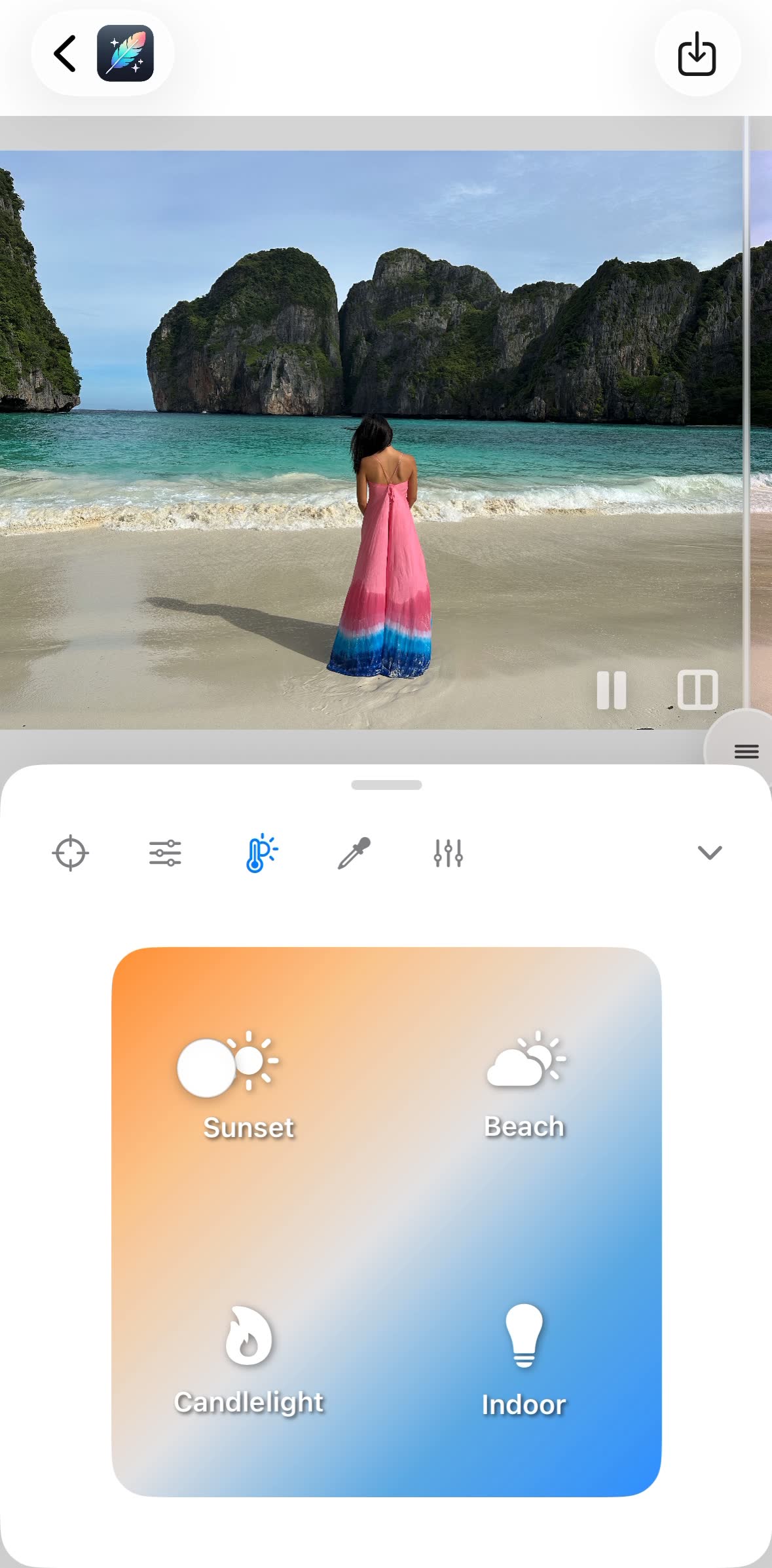
Golden Hour in One Tap
Warm any photo toward sunset tones with built-in presets: Sunset, Beach, Candlelight, and Indoor. Get the golden glow while keeping the subtle color gradients that make warm photos truly spectacular.
Get perfect Colors Like a Pro (But Easier!)
Choose the perfect white balance with the White Balance Sampler. Tap anything that should be neutral, like a wall, a road or a cloud, and watch the whole photo rebalance in real time. No editing skills needed.
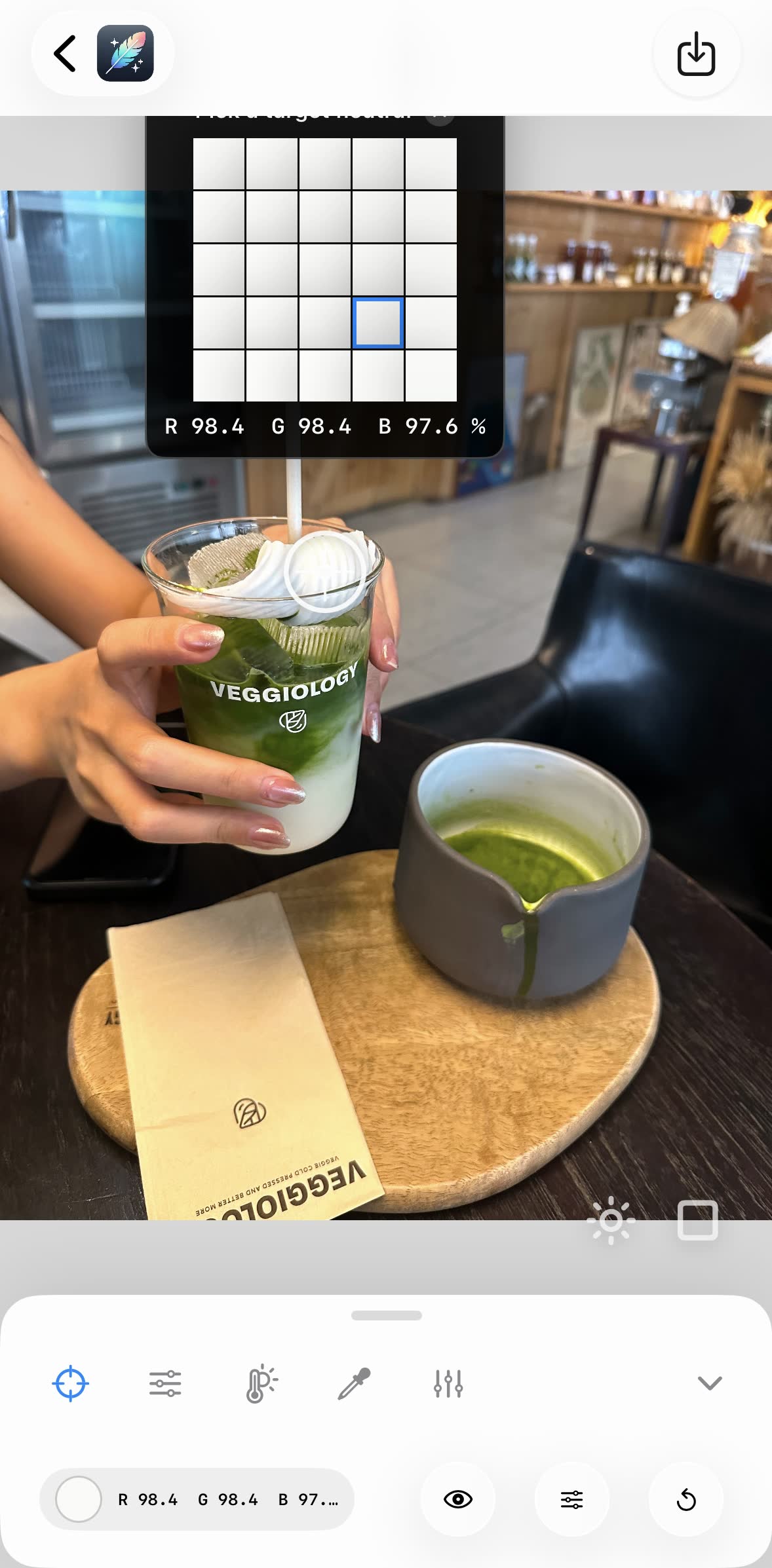
One-Tap White Balance Sampler
Point the sampler at anything neutral, like a white cup or a gray table, and every color falls into place. No complex settings, just precise control that makes food photos and more look right every time, with a live preview as you drag.
Transform Dull Colors into Glowing Paradise
Turn bland shots into winning travel content. Our app transforms ordinary ocean views into glowing crystal-blue waters that make your followers dream of tropical escapes.

Make Ocean Blues Radiate
Stop settling for lifeless water views. See the correction side by side: radiant blue seas and crisp detail, instantly, turning basic ocean shots into winning wanderlust content.
Create Stunning Vacation Photos
Transform your travel memories into award winning shots. Our app helps you capture the perfect vacation vibes that make your followers wish they were there.
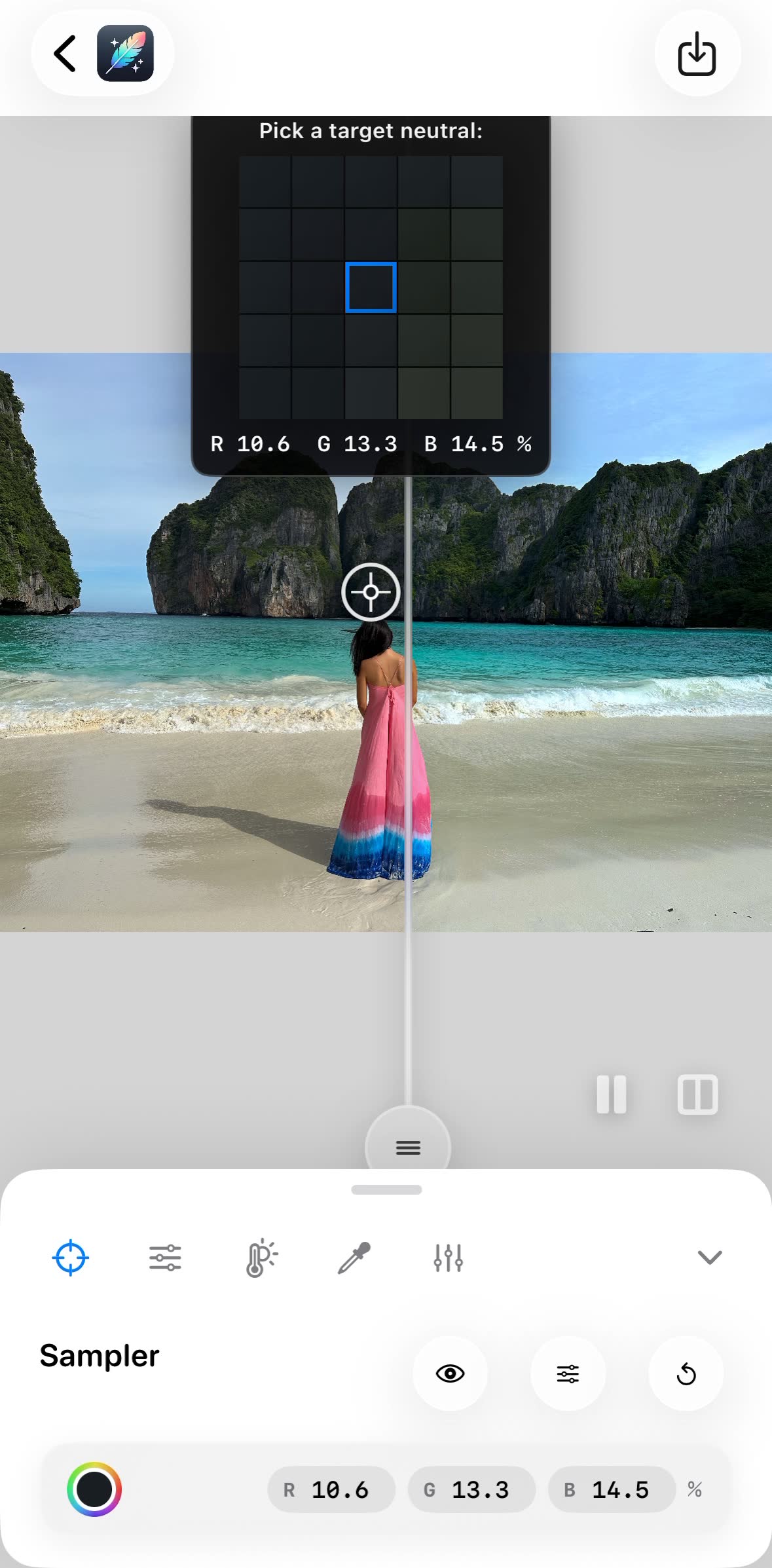
Perfect Travel Photos, Compared Live
Drag the split-view slider to compare before and after as you edit. Perfectly balanced colors keep the vibrant atmosphere of your destination, no guesswork needed.
Hundreds of people are fixing their colors with White Balancer.
Here is what users say about it.
No AI
traditional image processing only
Hundreds of users
editing photos every week
100% on-device
photos never leave your phone
No login needed
no account, edit seconds after installing
Frequently asked questions
If you have anything else you want to ask, email us at [email protected]. We reply within one business day.
What is White Balancer?
White Balancer is a free iPhone app that puts the color back into flat, washed-out photos and videos in one tap. Phone cameras guess at the lighting and often guess flat, so the vivid colors you saw come back grey. Tap one neutral point with the White Balance Sampler and the real color returns across the whole shot, usually in under 10 seconds.
What is the White Balance Sampler?
The White Balance Sampler is the one-tap tool at the heart of the app. Tap anything in the photo that should be neutral, such as a white wall, a grey road or a cloud, and the whole photo rebalances around it. It is the same neutral-picker technique professional editors use, without the menus.
Is White Balancer a Lightroom alternative?
For fixing color, yes. If you open Lightroom Mobile mainly to rescue washed-out or grey photos, White Balancer does that job in one tap, for free, with no login, no subscription and no AI. It is not a full RAW editor: there is no masking or catalog, so keep Lightroom if you need those.
Does the app use AI?
No. White Balancer does not use AI. It uses proven, traditional image processing to adjust the white balance of your photos and videos, so results are predictable and your images stay yours.
Are my photos and videos processed online or offline?
All photo and video processing happens locally on your iPhone; it even works in airplane mode. Your photos and videos are never uploaded to a server.
Do I need to log in or create an account?
No. There is no login, no signup and no credit card. Download White Balancer and start editing immediately; every editing feature is free and nothing is tied to an account.
Is there a monthly subscription fee?
No, never a subscription. Every editing feature is free, supported by ads. If you prefer, a single one-time purchase of $4.99 removes ads forever. That is the only payment in the app, which makes it a photo editor without a subscription.
How much does it cost?
The app is free: every editing feature is included at no cost, supported by ads. An optional one-time $4.99 purchase removes ads forever; there are no other charges and no subscription.
Does it work on video?
Yes. White Balancer corrects the color of videos as well as photos, with a live preview while you pick the neutral point, trimming, and full-resolution export with no watermark.
Will editing affect the quality of my photos and videos?
No. The app edits at full resolution and exports without any watermark, so your photos and videos keep the highest possible quality.
Which devices are compatible with White Balancer?
The app runs on iPhone with iOS 18.1 or later. Check the App Store listing for specific device requirements.
Can I edit several photos at once?
You can select several photos, but each one is edited individually so the neutral point is right for that shot. Recent edits are saved, so you can quickly reopen and continue any of them.
How can I share my adjusted photos and videos?
Once you have perfected your photo, share it directly from the app to your favorite social platforms or save it to your camera roll, at full resolution, with no watermark.
Is my original photo preserved after editing?
Yes. The original photo remains intact. The app edits a copy of your image, so you always have access to the unedited version.